One partition, one consumer: watching Kafka share the work
One partition, one consumer: watching Kafka share the work
I’ve read the same sentence about Kafka a hundred times: “a consumer group splits the partitions between its consumers, and rebalances when one joins or leaves.” I believed it. But I had never watched it happen. So I stopped reading and ran it.
Quick context: my topic orderbook.raw has 6 partitions, and the key of every message is the trading symbol, so every BTCUSDT update always lands on the same partition. My calc service reads that topic as a consumer group called calc.
Then three small steps.
One instance. I start one consumer. rpk group describe calc shows it owns all 6 partitions. One process doing all the work. Fine for now.
Two instances. I start a second consumer, same group, nothing else changed. A couple of seconds later rpk shows two members: one has partitions 0, 2, 4, the other 1, 3, 5. I didn’t write a single line of code to split anything. Kafka did it. That’s the part the sentence never makes you feel: the split is automatic.
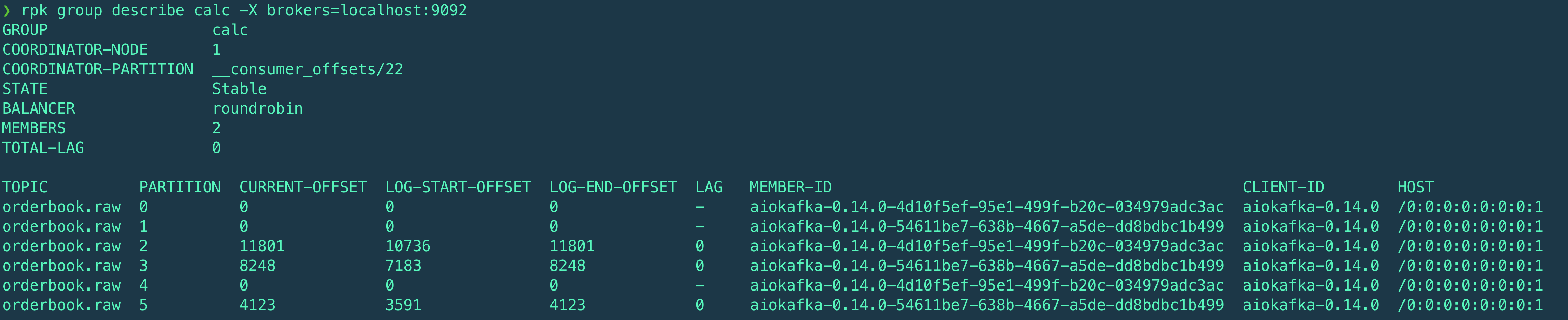
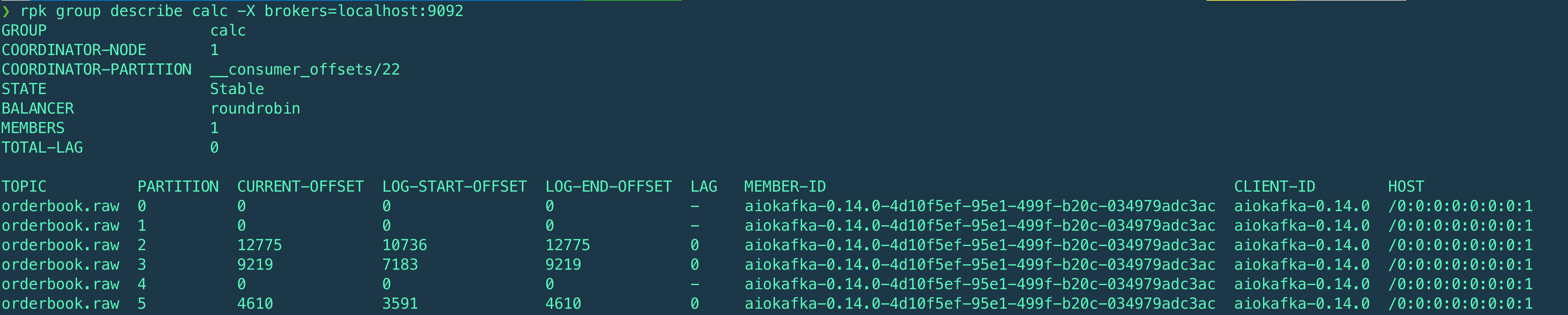
Kill one. I ctrl+C one of them. For a second or two nobody is reading those three partitions. Then rpk shows the survivor holding all 6 again, lag back to 0. No message lost. That’s the failover, also for free.
Why this matters:
A detail I didn’t expect. Look at the offsets: partitions 0, 1 and 4 are empty, only 2, 3 and 5 carry data. I have 6 partitions, but my symbols only hash into 3 of them. That’s the catch nobody tells you: the partition count sets the ceiling for how far you can scale, but your keys decide whether you actually reach it. If I doubled my consumers right now, three of them would sit idle — not because Kafka failed, but because my keys don’t spread wide enough yet. More symbols, or a better spread, would fix it. Good thing to know before you pay for six machines.
This is how you scale out. More load? Add consumers, up to the number of partitions. With 6 partitions, 6 consumers is the ceiling — a 7th just sits idle, because there is no partition left to give it. So the partition count isn’t a small detail, it’s your scaling ceiling, and you decide it when you create the topic. The key does more than balance load. Because the symbol is the key, BTCUSDT always goes to the same partition, so always to the same consumer. That means the order book I keep in memory for BTC lives in exactly one instance. It’s never duplicated, never split across two processes fighting over it. Partitioning by symbol spreads the work and keeps each symbol’s state in one place.
One honest note: I didn’t hit a fire here. Nothing broke. I set this up on purpose, to see the mechanism and to check that my partition key really does what I claimed. I think that’s worth doing before production, not after.
And the cost side, because nothing is free:
The rebalance isn’t instant. For a moment during the handoff, some partitions aren’t being read. At my volume (~5 msg/s per symbol) that’s nothing, but it’s real. When a consumer inherits a new partition, it inherits a symbol whose book it doesn’t have in memory yet. That’s exactly where my STALE/resync step earns its place: the new owner pulls a fresh snapshot and rebuilds before it trusts the data. Rebalancing and resync are the same story from two sides.
What I’d watch in production: consumer lag per partition, and how often a resync happens. Frequent resyncs would tell me something upstream is wrong — a slow consumer, a bad network — long before the output looked off.
That’s it. No drama. Just the thing moving, finally, in front of me.